Key & Asset Management Systems
If you require a system that can store keys, key bunches and valuable assets (such as phones, computers and weapons) and is completely customisable then look no further. From large wall cabinets to small safes, we have a range of key and asset management systems available to meet all your security needs. The IQ Key and Asset management system provided by Surelock McGill uses RFID tags and locks to secure anything within the individual module or the cabinet as well as benefiting from exclusive tracking software that allows and records the movement of keys and assets - giving you complete audit trail.
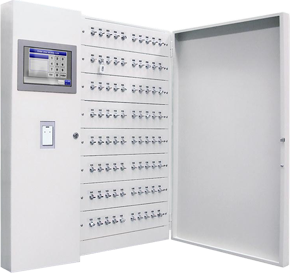
features
- 4 cabinet types available; thin wall cabinet/ key & box cabinet/ storage cabinet / safe
- Minimum capacity is 1 box or 10 keys
- Highest capacity is 200 boxes or 400 keys
- Emergency open function using a key and button or external output
- Finger print, facial recognition and alcotest enhancements available
benefits
- Built in safe for higher security available
- Impass level 4 fully integrated Swedish certificate
- Modular design offers the ability to expand the unit in the future
- Easy to install – plug & play
- Remote support available
- 2-year warranty
Operating the Loxtop cabinet
Step 1
Provide user authentication to the Loxtop cabinet. This can be done using a mixture of user PIN/password, swiping RFID key cards, or fingerprint recognition.
Step 2
Successful authentication will then allow you specify the asset or key required from the device. This can be done by selecting the storage module or key from the touch screen interface.
Step 3
Once the required assets have been confirmed, the appropriate doors will unlock providing the user access to the selected storage modules or key holders. These items can then be removed freely from the Loxtop cabinet. Each asset or key that is removed from the system is tracked, including time stamping and user log.
Step 4
Once the asset or key can be returned, the asset may be replaced using the same method as it was removed by simply logging onto the system and inserting the asset into it's original location. Depending on the configuration, placing an asset or key into the wrong location will cause the indicator to flash red, advising the user to the incorrect placement.
Provide user authentication to the Loxtop cabinet. This can be done using a mixture of user PIN/password, swiping RFID key cards, or fingerprint recognition.
Step 2
Successful authentication will then allow you specify the asset or key required from the device. This can be done by selecting the storage module or key from the touch screen interface.
Step 3
Once the required assets have been confirmed, the appropriate doors will unlock providing the user access to the selected storage modules or key holders. These items can then be removed freely from the Loxtop cabinet. Each asset or key that is removed from the system is tracked, including time stamping and user log.
Step 4
Once the asset or key can be returned, the asset may be replaced using the same method as it was removed by simply logging onto the system and inserting the asset into it's original location. Depending on the configuration, placing an asset or key into the wrong location will cause the indicator to flash red, advising the user to the incorrect placement.